
Reports and costs
Open an account and choose "Reports". The page reads Meta's analytics for the last 24 hours, 7, 30 or 90 days, or 12 months, and says in plain words what each number means. It has four short tabs: costs, all messages, templates and calls (only when the account has calls). It only reads; nothing is sent or changed.
Costs
The amount Meta charged for messages delivered in the range, how many were paid and how many free, and the cost over time (by half hour for 24 hours, by month for 12 months, by day otherwise). Below it, the cost by category and by customer country; "More details" adds paid or free, each number and volume discounts.
- "Paid" covers marketing and authentication templates, utility templates, and service replies after the free tier.
- "Free from an ad or page button" is a 72-hour window that starts when a customer messages you from an ad or a page button.
- Filter by one number or one country at the top.
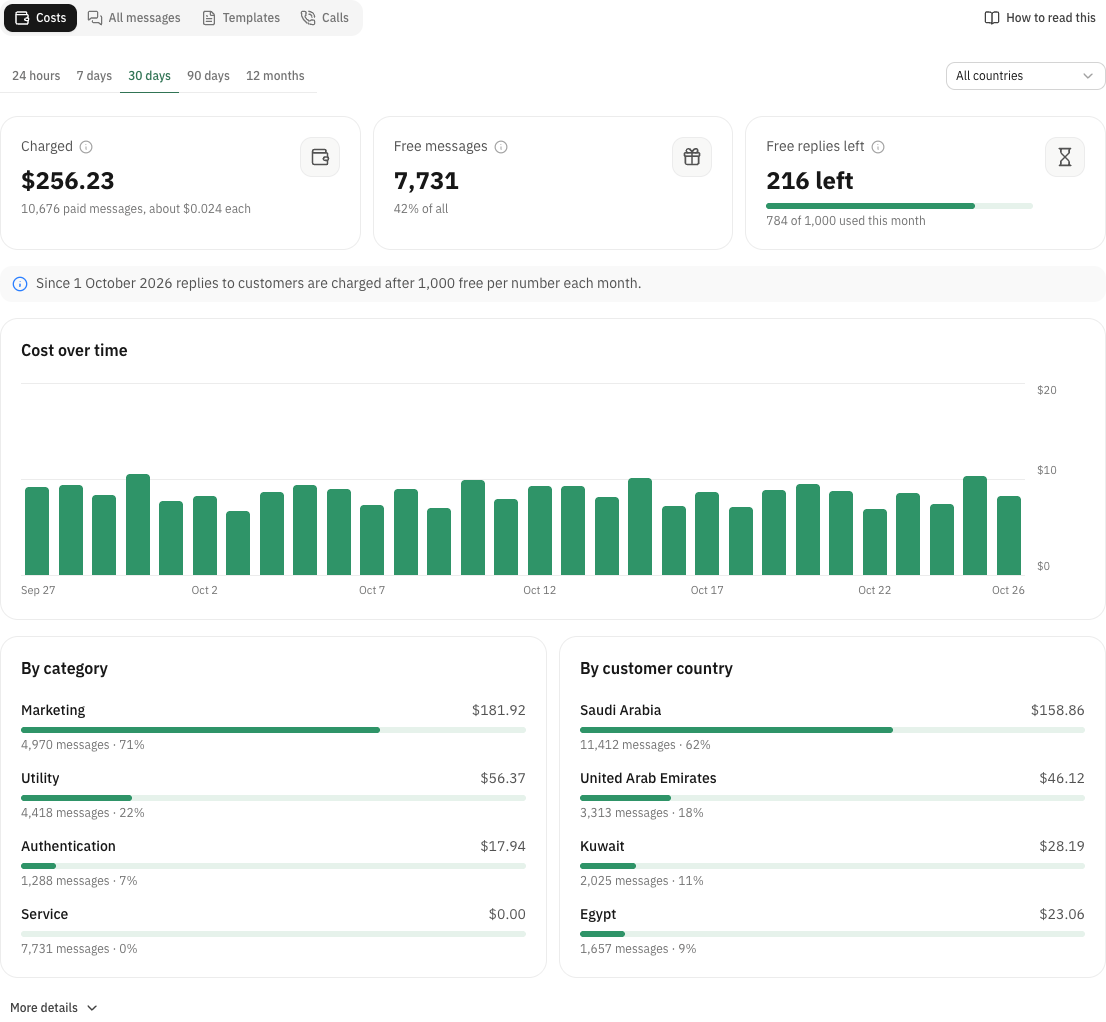
The 1,000 free service messages
Since 1 October 2026 Meta charges for service messages, the replies you send inside a 24-hour customer window. Each number still gets 1,000 free ones a month; the card shows how many are left for this month. Utility templates sent inside a customer window are charged too.
- The free tier resets on the 1st of each month and unused messages don't carry over.
- If it runs out early, answer in fewer, fuller messages, or move routine replies to a template customers ask for.
Volume discounts
Utility and authentication templates get cheaper as you send more to one country in a month. When Meta reports a tier, the page shows how far you are and how many messages are left to the next one. Marketing has no tiers.
All messages
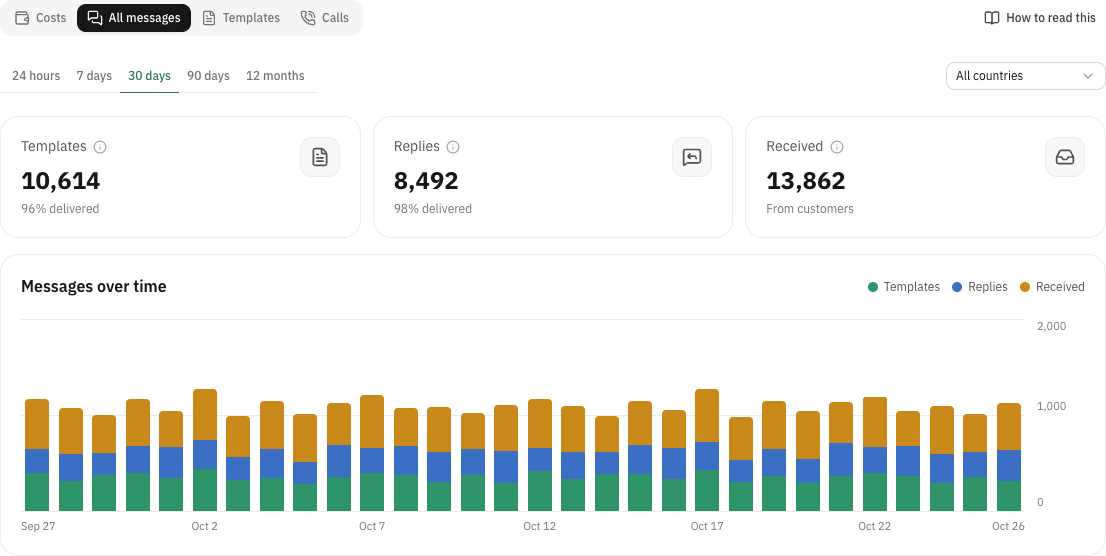
Every message, not only templates: templates you sent, free-form replies from your team or bot, and messages customers sent you, with how many were delivered. This shows how busy each number really is.
Comparing two templates
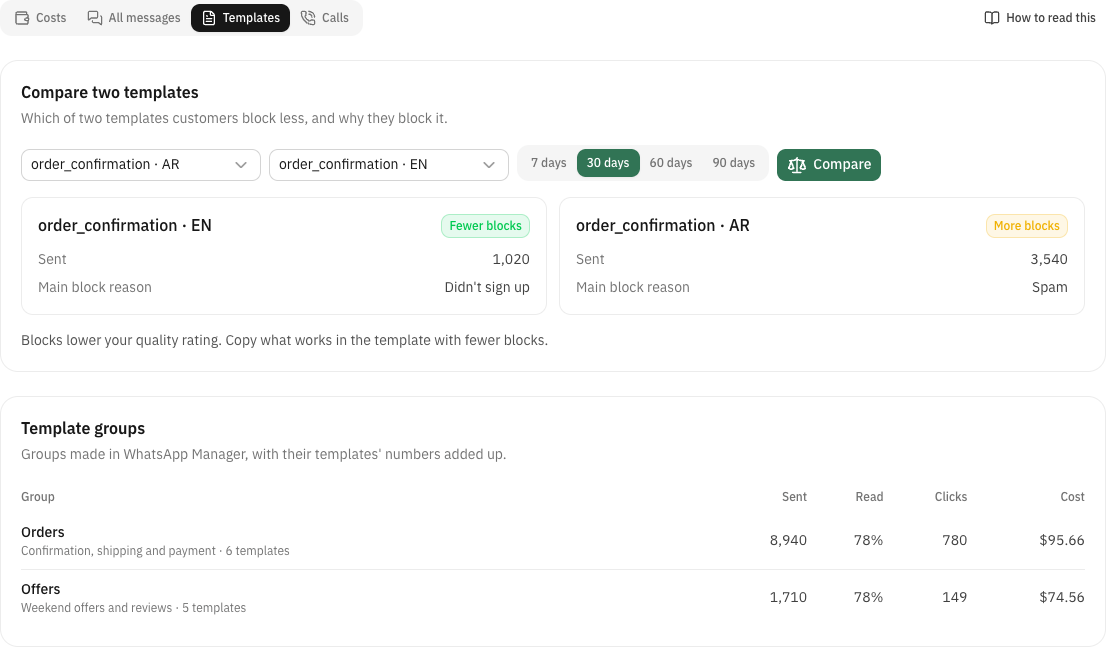
Pick two approved templates and 7, 30, 60 or 90 days. Meta answers which one customers block less, how many times each was sent, and the main reason people blocked it.
- Meta only compares templates that were each sent at least 1,000 times in the chosen days. With fewer, the page says so; pick a longer range or wait.
- Blocks lower the number's quality rating. Learn from the template with fewer blocks.
Template groups and calls
When the account has template groups made in WhatsApp Manager, the page lists them with their sends, read rate, clicks and cost for up to the last 90 days. When the account had WhatsApp calls, it shows how many, what they cost and how long they lasted. Accounts without either don't see these parts.
Meta's limits at a glance
- How far back
- 1 year for costs, messages and calls; 90 days for template groups; 7, 30, 60 or 90 days for a comparison
- Free service messages
- 1,000 per number per month since 1 October 2026; Meta charges from the 1,001st; they don't roll over
- Comparison
- two templates of the same account, each sent at least 1,000 times in the chosen days
- Freshness
- Meta's numbers are approximate and can be a few hours behind; the app keeps an answer for 10 minutes
- Costs
- not shown when the account pays through a Solution Partner's credit line